admin
Your products can be excellent and still be hard to find on Google. To improve SEO for a Shopify store, fix access and indexing problems, match products and collections to buyer searches, strengthen product information, and make the store easy to use. Then track purchases alongside search traffic so you can see what the work contributes.
You don't need to tackle every page at once. Start with products you can fulfill, collections with clear demand, and problems that block customers from finding or buying them.
Maaz Digital Marketing helps businesses connect SEO, content, and conversion improvements. This guide shows what to prioritise, where to make changes, and how our e-commerce portfolio can help you assess our work before discussing your project.

What should you prioritize first to improve your Shopify SEO?
Start with the obstacle closest to your store's current problem. If important pages aren't indexed, investigate access and indexing. If they appear but attract few relevant visitors, review targeting and content. If visitors arrive but don't buy, examine the product offer, mobile experience, delivery information, and checkout journey.
Use this starting checklist before buying another app or commissioning dozens of blog posts:
|
What you're seeing |
First action |
What to check afterwards |
|---|---|---|
|
Important products aren't indexed |
Inspect representative URLs and their indexing settings |
Google can access the intended pages; review indexing status |
|
Collections appear for unsuitable queries |
Compare search intent with products and page copy |
More relevant queries and visits to those collections |
|
Relevant impressions but weak clicks |
Review the search result, competing offers and page title |
Click-through rate for comparable queries and positions |
|
Organic visits but few purchases |
Test product selection, delivery costs and checkout |
Purchase conversion rate and revenue with consistent attribution |
|
Performance dropped after a redesign |
Compare URLs, redirects, navigation and template changes |
Critical pages remain accessible and correctly linked |
What does Shopify handle automatically, and what still needs your attention?
Shopify provides a technical starting point, including automatically generated sitemaps and built-in SEO features. Your store still needs relevant targeting, useful product information, clear navigation, and ongoing checks. Themes, apps, and custom changes affect the finished site, so having a feature available isn't the same as confirming it works correctly.
|
Platform starting point |
Your practical responsibility |
|---|---|
|
Generated sitemap |
Submit it and investigate important pages that aren't indexed |
|
Canonical handling |
Check the rendered tags after theme or app changes |
|
Editable search listings |
Write accurate titles and descriptions for priority pages |
|
Theme and product-data features |
Validate the actual output and resolve conflicting markup |
Shopify explains these foundations in its SEO overview.
Get a clear starting point. Send Maaz Digital Marketing your Shopify URL and tell us where you want to sell. Request a free audit and discuss the fixes that deserve attention first. Chat with Maaz on WhatsApp.
How do you find Shopify keywords that attract potential buyers?
Find keywords by combining customer language, your product catalogue, existing Search Console queries, and the search results in your target market. Choose phrases that fit what you actually sell. A smaller, specific buying query can be more useful than a broad term that attracts people your products won't suit.
Start with one product family. List its materials, uses, sizes, compatibility requirements, and common buying questions. Check the results for each promising phrase: are shoppers being shown collections, individual products, or guides? Use that evidence to choose the right destination.
Which keywords belong on collection pages, product pages, and blog posts?
Collection pages usually suit searches where shoppers want a choice of products. Individual product pages suit searches for a particular item or model. Guides answer questions that need explanation before a purchase. Match each query to the page that best fulfills its purpose, rather than making every page target everything.
|
Illustrative query |
Suitable page |
Useful content |
|---|---|---|
|
Linen duvet covers |
Collection |
Available sizes, colours and relevant products |
|
Natural linen duvet cover king size |
Product or focused collection, depending on results |
Exact dimensions, fabric and availability |
|
Linen vs cotton bedding |
Buying guide |
Honest comparison with links to suitable products |
These are planning examples, not measured search-volume claims. Keep the primary topic clear, then use related terms naturally. Shopify provides instructions for editing titles, descriptions and image alt text.
How should you prioritize keywords for your target countries?
Prioritise countries you can serve reliably, then research the language and shopping terms used there. Compare demand, competition, product availability, and commercial value within each market. Worldwide SEO doesn't mean repeating one keyword list everywhere; a product can have different names, sizing conventions, and buying expectations across countries.
For example, a clothing store may need to research both “trainers” and “sneakers.” Check the actual results and customer wording before assigning either term. Don't create country pages for markets your store can't fulfill.
How do you optimize Shopify collection pages for commercial searches?
Give each collection a clear shopping purpose, an accurate title, useful introductory information, and an appropriate selection of products. Make it easy to reach through navigation and related pages. The goal is to help shoppers compare suitable options while giving search engines a clear understanding of the collection's subject.
A collection called “Summer Edit” may work for a campaign but leave its contents unclear to a new visitor. If it contains linen shirts, a descriptive title such as “Men's Linen Shirts” explains the offer immediately. Keep seasonal branding in supporting copy where it helps.
Open the relevant collection in Shopify, review its title and description, then edit its search engine listing. Add helpful selection advice without pushing products far down the mobile screen. Link to related collections when the relationship makes sense.
Check the result: Can a shopper reach the collection from the menu, understand what's sold, and open a suitable product without using site search? Google recommends crawlable links through an e-commerce site's hierarchy in its navigation guidance.
How do you improve Shopify product pages for rankings and purchases?
Improve product pages by making the item easy to identify, evaluate, and buy. Use specific titles, original descriptions, clear images, accurate availability, and useful purchase details. Connect the page to relevant collections and guides. Search visibility brings people to the product; the offer and shopping experience help them decide.
What should product titles, descriptions, and images include?
Product titles should identify the item and its meaningful distinguishing features. Descriptions should explain materials, dimensions, compatibility, care, or use as relevant. Images should show the product clearly, with descriptive alt text where appropriate. Don't pad every field with keywords or replace factual details with claims like “best quality.”
Consider this illustrative rewrite for a bedding product:
- Generic: “Premium duvet cover. Great quality. Buy now.”
- Specific: “Washed linen duvet cover, 230 × 220 cm, with button closure. Includes one duvet cover; pillowcases are sold separately.”
The second version answers questions. It should only be used if those specifications are true. Add fabric composition, washing instructions, and images of the closure if they're relevant to the item.
In Shopify, open the product to edit its content and media, then review its search engine listing. Keep established URLs unless there's a sound reason to change them; plan redirects before changing a handle.
What information helps an organic visitor decide to buy?
Buyers need to understand the total offer: price, available variants, stock, delivery, returns, and the product's suitability. Put essential details near the buying decision and make them readable on mobile. Genuine reviews and clear contact information can support trust, but they shouldn't substitute for complete, accurate product information.
Test the page as a new customer in your target country. Choose a size, check shipping costs, and go through the cart. Look for surprises: a currency change, an unavailable destination, or a size guide hidden behind a broken link.
These checks support conversion. They aren't a claim that adding a returns paragraph directly raises Google's rankings.
Which technical SEO problems can limit a Shopify store's visibility?
Technical problems can stop search engines reaching important content or make the intended page unclear. Check access restrictions, indexing directives, canonical tags, broken links, redirects, and template output. Start with affected products and collections, then investigate the shared cause so you can fix a whole pattern instead of isolated URLs.
How do you check whether Google can find and index important pages?
Use Google Search Console to inspect representative product and collection URLs, review indexing reports, and submit your sitemap. Confirm the launched store is publicly accessible and important pages have crawlable internal links. If a page isn't indexed, read the reported reason before deciding on a fix or requesting another crawl.
- Verify the store's domain in Search Console.
- Submit the sitemap at your domain's /sitemap.xml address.
- Inspect a priority collection and product URL.
- Check access, indexing directives, and Google's selected canonical.
- Correct confirmed problems and monitor the affected pages.
Shopify automatically maintains its sitemap. Submission helps discovery; it doesn't guarantee indexing or a deadline. See Shopify's sitemap instructions.
How should you handle duplicate URLs, filters, and product variants?
Identify the pages you want customers to discover, then check that canonical tags, internal links, and sitemap entries support those destinations. Filters and variants can create additional URLs without needing separate search landing pages. Useful variants still need accurate product information; don't block or remove URLs simply because they contain parameters.
A canonical identifies a preferred version among similar pages. Google treats canonical signals as guidance, so inspect its selected URL when troubleshooting. Avoid conflicting signals, such as linking mainly to one version while pointing its canonical elsewhere. Google's canonical guidance explains the distinction.
What should you do with out-of-stock products and discontinued URLs?
Keep temporarily unavailable product pages useful when the item is expected to return, with honest availability and suitable alternatives. For permanently removed products, consider a redirect only when a close replacement serves the same need. If there's no suitable replacement, a proper unavailable-page response can be more appropriate than an unrelated redirect.
Don't send every discontinued product to the homepage. A shopper looking for a specific spare part won't be helped by an unrelated catalogue. Update internal links and product data as part of the same change.
How do you improve mobile performance without disrupting your store?
Review your store's real-user performance, then investigate the templates and features causing slow loading, delayed interaction, or layout movement. Images, apps, video, and third-party scripts deserve attention. Test changes on a duplicate theme where possible, and recheck product selection, cart behavior, analytics, and checkout after any significant changes.
Use Shopify's performance reporting alongside diagnostic tools. Remove a feature because its cost outweighs its value, not just to chase a perfect lab score. Shopify outlines the impact of store features in its web-performance documentation.
How can product data help your Shopify products appear in search?
Accurate product data helps search systems understand what you sell, its price, and its availability. Review the structured data your theme and apps actually output, and keep it consistent with the visible page. Merchant Center can provide another product data source, including eligibility for free listings where requirements are met.
Test representative products with Google's Rich Results Test. Check different variant types, sale prices, and out-of-stock items. If two apps output conflicting prices or availability, resolve the conflict instead of adding another markup tool.
For variants, Google's documentation describes ProductGroup alongside Product markup. Use the approach that fits the store's real product structure. See Google's variant guidance and product-data sharing guide.
How do you improve Shopify SEO across different countries and languages?
Build your international setup around the markets you serve, using appropriate market URLs, languages, product availability, and local buying information. Shopify Markets provides technical international SEO features when configured correctly. Your job is to make each market's content useful, check the published setup, and measure performance by country and language.
|
Market requirement |
Practical check |
|---|---|
|
Language and terminology |
Product names and descriptions make sense to local buyers |
|
URL and language signals |
Intended market pages are accessible and correctly connected |
|
Product availability |
Customers see items they can actually order |
|
Buying information |
Currency, sizing, delivery and returns match the market |
|
Reporting |
Country-level results aren't hidden by a worldwide average |
Hreflang connects language or regional versions of a page. Shopify documents automatic handling for configured market URLs, but shared URLs without distinct language or regional versions don't create the same alternate-page setup. Review Shopify's international SEO guidance before changing your structure.
What content and links can support your Shopify sales?
Publish content that helps people choose, use, or compare products, then connect it to relevant items in your store. Earn links through useful resources and genuine business relationships. The strongest starting point is a customer question you can answer well, especially when the answer naturally leads to a suitable product.
Which buying guides and comparisons should you publish?
Start with questions your customers ask before buying: fit, compatibility, materials, maintenance, and differences between products. Give a clear answer, explain the trade-offs, and link to relevant options. A guide should help someone make a decision even if the right choice isn't your most expensive product or an immediate purchase.
A cookware store could explain which pans work on induction hobs, show how to check compatibility, and link to its suitable range. That creates a useful buying route. A broad article about “kitchen trends” needs a clearer connection to the catalogue before it deserves priority.
Concise answers and explicit product facts also make content easier to interpret. Google says its established SEO practices apply to AI search features; there's no special markup required just for AI overviews. See Google's AI search guidance.
How can your store earn relevant backlinks?
Earn links by giving relevant organizations a useful reason to reference your store. Supplier stockist pages, original resources, expert contributions, and appropriate industry coverage can support that work. Focus on audience fit and editorial value. Buying large batches of links doesn't replace a credible product offer or helpful content.
For example, a retailer's original compatibility chart may be useful to a specialist publication. The resource needs to be accurate and maintained; outreach works better when there's something worth sharing.
What can you learn from Maaz Digital Marketing's e-commerce portfolio?
Our e-commerce portfolio lets you review search visibility and purchase reporting before discussing an engagement. These examples show different parts of the customer journey, so read each with its context. A click measures a visit from search; a purchase event records tracked buying activity, and neither alone establishes profit.
Search visibility: Pakistan gym-accessories store
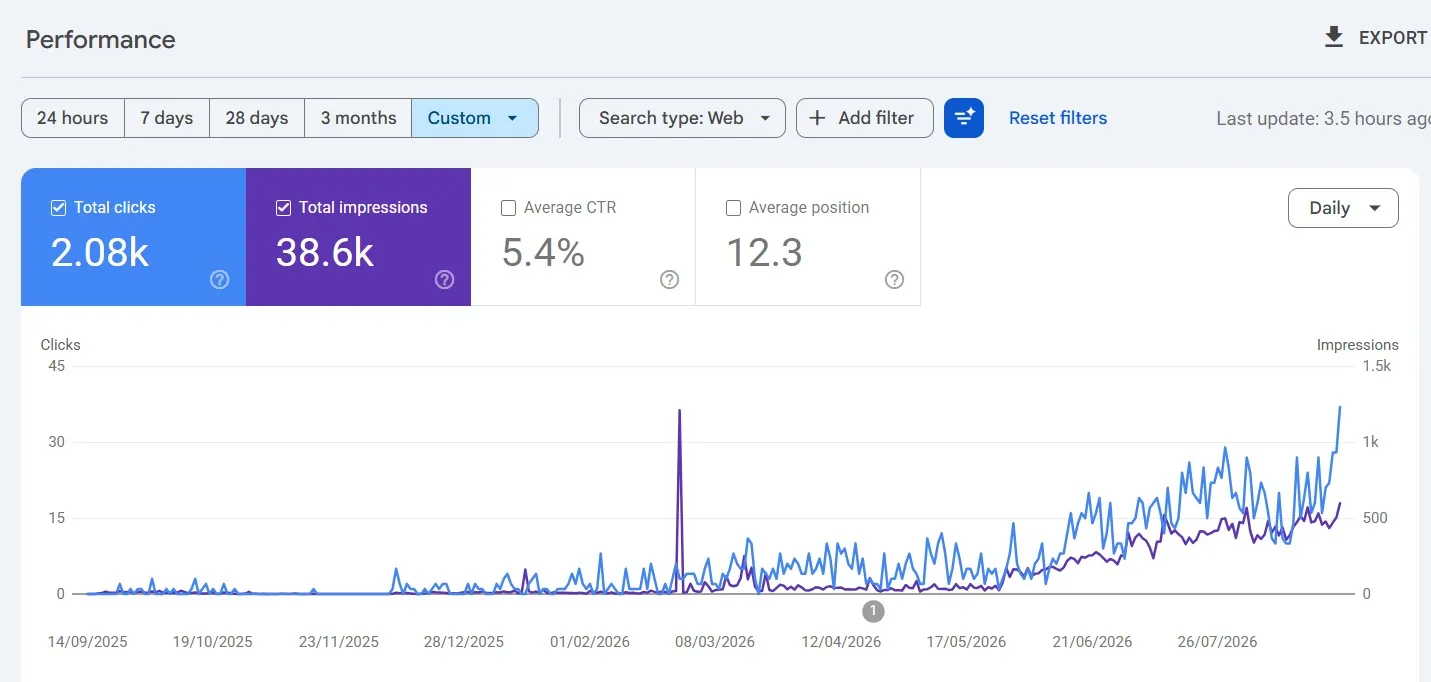
The gym-accessories example displays 2.08K clicks, 38.6K impressions, 5.4% CTR, and an average position of 12.3. The selected custom date range isn't fully shown. These are search-performance metrics, not order counts.
Purchases: US organic baby-food store

The baby-food report displays 59 purchase events and $7,215.60 total revenue in a google / organic row. It uses a first-user source/medium dimension, so it doesn't establish that every purchase happened during an organic-search session. The screenshot doesn't show the reporting period or refunds.
Explore these examples in our e-commerce SEO portfolio. They provide evidence to discuss when planning your Shopify project, not a forecast of your store's results.
Give your Shopify store a focused plan. Share your website, target countries, and main sales challenge. We'll discuss the SEO and conversion work your store needs. Discuss your project with Maaz.
How do you measure whether Shopify SEO is generating purchases?
Measure search visibility, relevant visits, purchase activity, and revenue together. Use consistent date ranges and attribution settings, and compare results against stock availability, promotions, and seasonality. Search Console shows search activity; analytics and store records help explain buying behaviour. A rise in clicks is useful, but it isn't a sales result.
|
Measure |
Source |
How to interpret it |
|---|---|---|
|
Queries, clicks and impressions |
Search Console |
Discovery and relevance; separate branded searches where useful |
|
Organic sessions and landing pages |
Analytics |
Visitors associated with the selected channel definition |
|
Purchases and conversion rate |
Validated analytics and Shopify reports |
Buying activity under the report's attribution and calculation |
|
Revenue and refunds |
Store records and matching reports |
Commercial outcome; compare equivalent measures |
Illustrative example: 1,000 organic sessions producing 20 purchase sessions give a 2% session purchase rate. If sessions rise to 1,500 but purchase sessions stay at 20, that rate falls to about 1.33%. Traffic grew; the number of purchasing sessions didn't.
Keep reporting scopes clear. First-user acquisition describes how a customer was originally acquired; session acquisition describes a visit. Google explains these distinctions in its traffic-source scope documentation. Search Console clicks and analytics sessions also measure different things, so don't expect identical totals.
What could your first 90 days of Shopify SEO work include?
Use the first 90 days to establish a baseline, remove confirmed obstacles, improve priority shopping pages, and review early evidence. The sequence depends on your store's condition and available resources. It's a work plan, not a promise that rankings or revenue will reach a particular level within three months.
|
Period |
Main work |
Reviewable output |
|---|---|---|
|
Days 1–30 |
Audit, measurement checks, keyword mapping and urgent fixes |
Prioritised backlog and baseline report |
|
Days 31–60 |
Collection and product improvements, internal links and product-data checks |
Updated priority pages and implementation record |
|
Days 61–90 |
Supporting content, further technical work and performance review |
Published assets, progress analysis and next priorities |
Access delays, approvals, catalogue size, and development work can change the schedule. Agree on owners and deliverables early so the project doesn't become a list of recommendations nobody implements.
How can Maaz Digital Marketing help improve your Shopify store?
Maaz Digital Marketing can bring research, content, technical SEO, and conversion review into one agreed project. We start with your products, markets, and current obstacles, then prioritise the work. You'll have a clearer basis for deciding what to fix, what to publish, and how progress will be assessed.
Founder Maaz Ahmed brings more than six years of experience, with work across Pakistan, the USA, Germany, the UAE, Canada, Australia, and Europe. Our agency overview explains that background. For your store, the useful question is how that experience translates into specific tasks and accountable delivery.
What can a Shopify SEO project include?
A Shopify SEO project can include an audit, keyword mapping, collection and product optimisation, technical fixes, content planning, and reporting. The exact scope should match your store's needs and the team's agreed implementation responsibilities. You'll know which pages are included, who makes changes, and what evidence will be used to review progress.
- SEO audit: Identify access, targeting, content, and measurement issues.
- Shopping-page improvements: Strengthen priority collections and products.
- Technical implementation: Address agreed theme, navigation, redirect, or data problems.
- International planning: Align content and structure with your target markets.
- Performance review: Connect search changes with visits and recorded purchases.
What determines the scope and cost of your project?
The scope and cost depend on catalogue size, target markets, languages, technical condition, and the implementation required. A focused collection-page project differs from ongoing international SEO with development support. Ask for a proposal that identifies deliverables, responsibilities, reporting, and fees so you can assess the work beyond a headline price.
Send a few priority product links and explain what isn't working. Perhaps collections don't rank, overseas visitors can't buy, or organic traffic has stopped growing. That context makes the first conversation more useful than a general request for “more SEO.”
Start your Shopify SEO project. Share your store URL, target countries, and main challenge with Maaz Digital Marketing. Request your free audit and discuss a practical next step. Start on WhatsApp.
Frequently asked questions
Is Shopify good for SEO?
Shopify supports SEO through built-in features and editable store content, but results depend on how the store is organised, maintained, and marketed. You still need useful products and collections, relevant targeting, accessible pages, and a shopping experience that serves your customers in the markets you're trying to reach.
Do I need a paid Shopify SEO app?
You don't need a paid SEO app to begin improving titles, product content, navigation, and search measurement on Shopify. An app can help with a specific task at scale, but choose it after identifying the problem and checking that it won't duplicate features or conflict with your existing setup.
How long does Shopify SEO take to show results?
There's no fixed timeline because competition, store history, technical problems, content quality, and implementation speed all affect progress. Review completed work and early search signals first, then assess purchases over suitable comparison periods; a 90-day work plan isn't a guarantee of rankings, traffic growth, or a particular revenue outcome.
Why does my Shopify store get traffic but few purchases?
Traffic may not convert when visitors aren't suitable buyers or the product, price, delivery terms, and shopping experience don't meet their needs. Review organic landing pages and buying steps alongside tracking accuracy, then fix the specific obstacle instead of assuming that publishing more content will automatically produce more purchases.
Can Maaz manage SEO for an international Shopify store?
You can discuss an international Shopify SEO project with Maaz Digital Marketing, including target-market research, product and collection improvements, technical work, and reporting. Share your countries, languages, catalogue, and main challenges so the proposed scope can reflect the store's actual needs, with deliverables and responsibilities agreed before implementation begins.